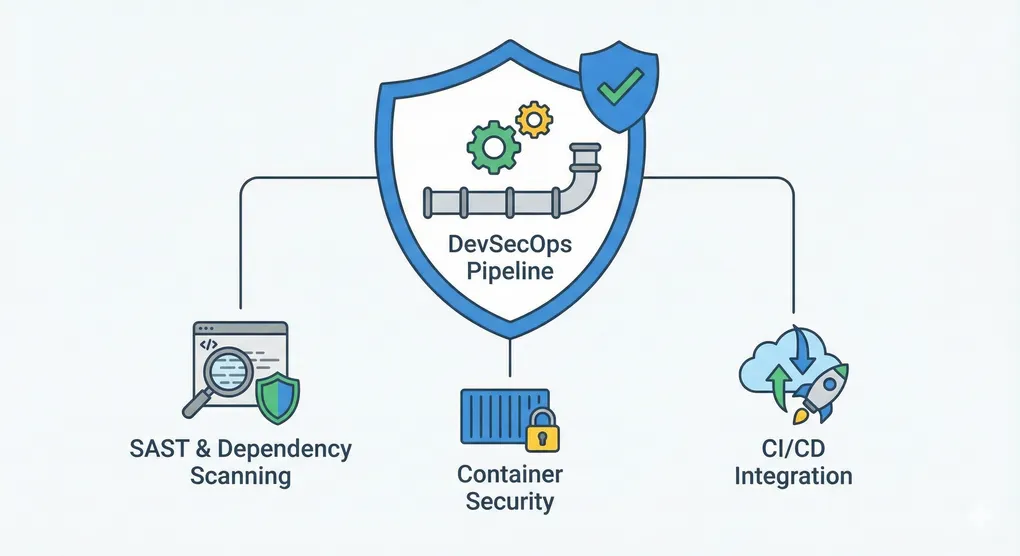
DevSecOps & Security Tools: Kod Güvenliğini Otomatikleştirmek
Giriş
DevSecOps’un temel felsefesi basit ama güçlü: Güvenliği geliştirme sürecinin sonuna bırakma, en başından itibaren entegre et.
Production’a ulaşmış bir güvenlik açığını düzeltmek, development aşamasında bulup düzeltmekten kat kat daha maliyetli. Bu yazıda pipeline’ınıza entegre edebileceğiniz araçları ve teknikleri inceleyeceğiz.
1. Static Application Security Testing (SAST)
1.1 Python: Bandit
# Kurulum
pip install bandit

# Tarama
bandit -r ./src

# Detailed report
bandit -r ./src -f json > security_report.json

# Spesifik kuralları ignore et
bandit -r ./src -s B101,B601
Bandit Konfigurasyonu:
# .bandit
exclude_dirs:
  - /tests
  - /venv

tests:
  - B101  # assert_used
  - B601  # parametrized_sql_query
  - B602  # shell_injection

severity_level: MEDIUM
1.2 Python: Semgrep
# Kurulum
pip install semgrep

# Tarama
semgrep --config=p/security-audit ./src

# Spesifik rule'larla
semgrep --config=p/owasp-top-ten ./src

# JSON output
semgrep --config=p/security-audit --json ./src > findings.json
Semgrep Konfigurasyonu:
# .semgrep.yml
rules:
  - id: hardcoded-secrets
    pattern-either:
      - patterns:
          - pattern: password = "..."
          - pattern: api_key = "..."
          - pattern: secret = "..."
    message: "Sabit şifre/anahtar bulundu"
    severity: ERROR

  - id: sql-injection
    patterns:
      - pattern: $DB.query($STR % $VAR)
    message: "SQL injection riski"
    severity: ERROR

  - id: insecure-deserialization
    patterns:
      - pattern: pickle.loads(...)
      - pattern: json.loads($VAR, object_hook=...)
    message: "Güvenli olmayan deserialization"
    severity: ERROR
1.3 JavaScript/TypeScript: ESLint Security Plugin
# Kurulum
npm install eslint-plugin-security --save-dev

# Konfigürasyon
cat > .eslintrc.json << EOF
{
  "plugins": ["security"],
  "extends": ["plugin:security/recommended"],
  "rules": {
    "security/detect-eval-with-expression": "error",
    "security/detect-non-literal-regexp": "warn",
    "security/detect-unsafe-regex": "error"
  }
}
EOF

# Çalıştırma
eslint --ext .js,.ts src/
2. Dependency Vulnerability Scanning
2.1 Python: Safety
# Kurulum
pip install safety

# Tarama
safety check

# Detailed report
safety check --json > dependencies.json

# Spesifik dosyayı kontrol et
safety check -r requirements.txt
2.2 Python: pip-audit
# Kurulum
pip install pip-audit

# Tarama
pip-audit

# Detaylı çıktı
pip-audit --desc

# Requirements dosyası
pip-audit -r requirements.txt
2.3 JavaScript: npm audit
# Yerleşik audit
npm audit

# Fix recommendations
npm audit --audit-level=moderate

# Otomatik fix
npm audit fix

# JSON output
npm audit --json > audit.json
2.4 Node.js: Snyk
# Kurulum
npm install -g snyk

# Giriş yap
snyk auth

# Tarama
snyk test

# Detaylı rapor
snyk test --json

# Sürekli monitoring
snyk monitor
3. Secret Management
3.1 Git: Detect Secrets
# Kurulum
pip install detect-secrets

# Başlat
detect-secrets scan > .secrets.baseline

# Yeni scan
detect-secrets scan --baseline .secrets.baseline

# Pre-commit hook
cat > .git/hooks/pre-commit << 'EOF'
#!/bin/bash
detect-secrets scan --baseline .secrets.baseline
EOF
chmod +x .git/hooks/pre-commit
3.2 Git: TruffleHog
# Kurulum
pip install trufflehog

# Git repository'de ara
trufflehog git file://.

# Dosya sistemde ara
trufflehog filesystem ./

# Regex ile custom pattern
trufflehog regex --regex '(password|api_key)\s*=\s*["\']([^"\']+)["\']' ./
3.3 Environment Variables & .env
# ❌ YANLIŞ: Hardcoded secrets
DATABASE_URL = "postgresql://user:password@localhost/db"
API_KEY = "sk-1234567890abcdef"

# ✅ DOĞRU: Environment variables
import os
from dotenv import load_dotenv

load_dotenv()  # .env dosyasını yükle

DATABASE_URL = os.getenv("DATABASE_URL")
API_KEY = os.getenv("API_KEY")

# Validation
if not DATABASE_URL:
    raise ValueError("DATABASE_URL environment variable required")
.env dosyası (Never commit to git):
# .env
DATABASE_URL=postgresql://user:password@localhost/db
API_KEY=sk-1234567890abcdef
SECRET_KEY=your-secret-key-here

# .gitignore
.env
.env.local
*.key
*.pem
4. Container Security
4.1 Docker Image Scanning: Trivy
# Kurulum
# macOS
brew install aquasecurity/trivy/trivy

# Linux
wget https://github.com/aquasecurity/trivy/releases/download/v0.45.0/trivy_0.45.0_Linux-64bit.tar.gz

# Image tarama
trivy image python:3.11

# JSON output
trivy image --format json python:3.11 > scan.json

# High severity göster
trivy image --severity HIGH,CRITICAL python:3.11
4.2 Docker Security Best Practices
# ❌ YANLIŞ
FROM ubuntu:latest
RUN apt-get update && apt-get install -y python3 pip
RUN pip install requests flask
COPY . /app
WORKDIR /app
CMD ["python3", "app.py"]

# ✅ DOĞRU
FROM python:3.11-slim

# Güvenli olmayan paketleri kaldır
RUN apt-get update && \
    apt-get remove -y --purge sudo && \
    apt-get clean && \
    rm -rf /var/lib/apt/lists/*

# Non-root kullanıcı oluştur
RUN useradd -m -u 1000 appuser

# Bağımlılıkları belirt
COPY requirements.txt .
RUN pip install --no-cache-dir -r requirements.txt

# Uygulamayı kopyala
COPY --chown=appuser:appuser . /app
WORKDIR /app

# Non-root olarak çalıştır
USER appuser

# Health check ekle
HEALTHCHECK --interval=30s --timeout=3s \
  CMD python -c "import socket; s = socket.socket(); s.connect(('localhost', 8000))"

CMD ["python", "-u", "app.py"]
4.3 Kubernetes Security: kubesec
# Kurulum
brew install kubesec

# Manifest kontrolü
kubesec scan deployment.yaml

# JSON output
kubesec scan deployment.yaml -o json

# Pod Security Policy kontrolü
kubesc scan --kubeconfig ~/.kube/config
5. SAST Integration: CI/CD Pipeline
5.1 GitHub Actions
# .github/workflows/security.yml
name: Security Scan

on:
  push:
    branches: [ main, develop ]
  pull_request:
    branches: [ main ]

jobs:
  security-scan:
    runs-on: ubuntu-latest

    steps:
    - uses: actions/checkout@v3

    - name: Set up Python
      uses: actions/setup-python@v4
      with:
        python-version: '3.11'

    - name: Install dependencies
      run: |
        pip install -r requirements.txt
        pip install bandit safety semgrep

    - name: Bandit Security Check
      run: bandit -r ./src -f json -o bandit.json
      continue-on-error: true

    - name: Safety Check
      run: safety check --json > safety.json
      continue-on-error: true

    - name: Semgrep Scan
      run: semgrep --config=p/security-audit --json ./src > semgrep.json
      continue-on-error: true

    - name: Upload reports
      uses: actions/upload-artifact@v3
      if: always()
      with:
        name: security-reports
        path: |
          bandit.json
          safety.json
          semgrep.json

    - name: Comment PR with results
      if: github.event_name == 'pull_request'
      uses: actions/github-script@v6
      with:
        script: |
          const fs = require('fs');
          const bandit = JSON.parse(fs.readFileSync('bandit.json'));

          let comment = '## Security Scan Results\n\n';
          comment += `- **Bandit Issues**: ${bandit.metrics.total_lines_of_code} LOC scanned\n`;

          github.rest.issues.createComment({
            issue_number: context.issue.number,
            owner: context.repo.owner,
            repo: context.repo.repo,
            body: comment
          });
5.2 GitLab CI
# .gitlab-ci.yml
stages:
  - scan
  - test
  - build

security-scan:
  stage: scan
  image: python:3.11
  script:
    - pip install bandit safety semgrep
    - bandit -r ./src -f json -o bandit.json
    - safety check --json > safety.json
    - semgrep --config=p/security-audit --json ./src > semgrep.json
  artifacts:
    reports:
      sast: bandit.json
    paths:
      - safety.json
      - semgrep.json
  allow_failure: true

container-scan:
  stage: scan
  image: aquasec/trivy
  script:
    - trivy image --format json --output trivy.json my-image:latest
  artifacts:
    paths:
      - trivy.json
  allow_failure: true
6. Code Quality & Security Metrics
6.1 SonarQube Integration
# Docker ile çalıştırma
docker run -d --name sonarqube -e SONAR_JDBC_URL=jdbc:h2:tcp://localhost:9092/sonarqube -e SONAR_JDBC_DRIVER=org.h2.Driver -p 9000:9000 sonarqube:latest

# Tarama
sonar-scanner \
  -Dsonar.projectKey=my-project \
  -Dsonar.sources=./src \
  -Dsonar.host.url=http://localhost:9000 \
  -Dsonar.login=YOUR_TOKEN
SonarQube Konfigurasyonu:
# sonar-project.properties
sonar.projectKey=my-project
sonar.projectName=My Project
sonar.sources=src
sonar.exclusions=tests/**,venv/**
sonar.python.coverage.reportPaths=coverage.xml
sonar.python.pylint_config=.pylintrc

# Quality gates
sonar.qualitygate.wait=true
6.2 OWASP Dependency Check
# Kurulum (macOS)
brew install dependency-check

# Tarama
dependency-check --project "My Project" --scan ./src

# JSON report
dependency-check --project "My Project" --scan ./src --format JSON --out ./reports

# Supression (False Positives)
cat > dependency-check-suppression.xml << 'EOF'
<?xml version="1.0" encoding="UTF-8"?>
<suppressions>
  <suppress>
    <packageUrl>pkg:npm/express@4.17.1</packageUrl>
    <cve>CVE-2021-12345</cve>
  </suppress>
</suppressions>
EOF

# Suppression ile çalıştırma
dependency-check --scan . --suppression dependency-check-suppression.xml
7. Runtime Security Monitoring
7.1 Falco (Container Runtime Security)
# falco-rules.yaml
- rule: Unauthorized Process
  desc: Detect unauthorized process execution
  condition: >
    spawned_process and
    container and
    proc.name not in (allowed_processes)
  output: >
    Unauthorized process started
    (user=%user.name command=%proc.cmdline container=%container.name)
  priority: WARNING

- rule: Suspicious File Access
  desc: Detect suspicious file access
  condition: >
    open and
    container and
    fd.name in (/etc/shadow, /etc/passwd) and
    proc.name not in (ls, cat, grep)
  output: >
    Suspicious file access
    (file=%fd.name process=%proc.name user=%user.name)
  priority: CRITICAL
7.2 Application Security Monitoring
# Aplicação
import logging
import json
from datetime import datetime

class SecurityEventLogger:
    """Güvenlik olaylarını kayıt et"""

    def __init__(self):
        self.logger = logging.getLogger("security")
        handler = logging.FileHandler("/var/log/security.log")
        self.logger.addHandler(handler)

    def log_security_event(self,
                          event_type: str,
                          severity: str,
                          user_id: str,
                          details: dict):
        """Güvenlik olayını kayıt et"""

        event = {
            "timestamp": datetime.utcnow().isoformat(),
            "event_type": event_type,
            "severity": severity,
            "user_id": user_id,
            "details": details
        }

        self.logger.log(
            logging.WARNING if severity == "HIGH" else logging.INFO,
            json.dumps(event)
        )

    # Örnek olaylar
    def log_failed_auth(self, username: str, ip_address: str):
        self.log_security_event(
            event_type="FAILED_AUTHENTICATION",
            severity="MEDIUM",
            user_id=username,
            details={"ip_address": ip_address}
        )

    def log_unauthorized_access(self, user_id: str, resource: str):
        self.log_security_event(
            event_type="UNAUTHORIZED_ACCESS_ATTEMPT",
            severity="HIGH",
            user_id=user_id,
            details={"resource": resource}
        )

    def log_privilege_escalation(self, user_id: str, old_role: str, new_role: str):
        self.log_security_event(
            event_type="PRIVILEGE_ESCALATION",
            severity="CRITICAL",
            user_id=user_id,
            details={"old_role": old_role, "new_role": new_role}
        )
8. Security Checklist & Automation
8.1 Pre-Commit Hooks
# .git/hooks/pre-commit
#!/bin/bash

echo "🔒 Running security checks..."

# Bandit check
bandit -r ./src -q
if [ $? -ne 0 ]; then
    echo "❌ Bandit failed"
    exit 1
fi

# Secret detection
detect-secrets scan --baseline .secrets.baseline
if [ $? -ne 0 ]; then
    echo "❌ Secrets detected"
    exit 1
fi

# Unit tests
pytest --cov=./src
if [ $? -ne 0 ]; then
    echo "❌ Tests failed"
    exit 1
fi

echo "✅ All checks passed"
exit 0
8.2 Security Policy YAML
# security-policy.yml
organization: "My Company"
version: "1.0"

policies:
  - id: no-hardcoded-secrets
    description: "Hardcoded secrets should not exist in code"
    tools: [detect-secrets, trufflehog]
    severity: CRITICAL
    action: FAIL_BUILD

  - id: known-vulnerabilities
    description: "No known vulnerabilities in dependencies"
    tools: [safety, pip-audit, npm-audit]
    severity: CRITICAL
    action: FAIL_BUILD

  - id: code-quality
    description: "Minimum code quality standards"
    tools: [bandit, semgrep]
    severity: HIGH
    action: WARN

  - id: test-coverage
    description: "Minimum 80% test coverage"
    threshold: 80
    severity: MEDIUM
    action: WARN

compliance:
  standards:
    - OWASP-Top-10
    - CWE
    - PCI-DSS
9. Security Training & Best Practices
## Developer Security Training

### 1. OWASP Top 10
- Injection attacks
- Broken authentication
- Sensitive data exposure
- XML external entities (XXE)
- Broken access control

### 2. Secure Coding Practices
- Input validation
- Output encoding
- Parameterized queries
- Principle of least privilege
- Fail securely

### 3. Common Vulnerabilities
- SQL injection
- Cross-site scripting (XSS)
- Cross-site request forgery (CSRF)
- Insecure deserialization
- Using components with known vulnerabilities

### 4. Tools Training
- SAST tools (Bandit, Semgrep)
- Dependency scanners (Safety, npm audit)
- Secret detectors (TruffleHog)
- Container scanners (Trivy)

### Resources
- OWASP WebGoat
- HackTheBox
- TryHackMe
- SANS Cyber Academy
Sonuç
DevSecOps felsefesi basit: Güvenliği sona bırakma, en baştan entegre et.
Otomatik araçlar, CI/CD pipeline’ındaki güvenlik kontrolleri ve sürekli monitoring sayesinde güvenlik açıklarını erken tespit edebilir, maliyetli hataları önleyebilirsiniz.
“Shift Left” prensibi burada kritik: Güvenlik kontrolleri ne kadar erken yapılırsa, düzeltme maliyeti o kadar düşük olur. Bir güvenlik açığını production’da değil, development aşamasında bulmak hem daha ucuz hem de daha güvenli.